Download JottNote Chrome Extension
Get the Chrome extension version of JottNote for quick access in your browser
Latest version includes: Bookmark Manager, Sessions, 14 Themes, Sort, Date, Syntax Highlighting
Download Extension (Latest)Installation Instructions
- Download and unzip the
jottnote-extension.zipfile to a permanent location on your computer - Open Chrome and navigate to
chrome://extensions/ - Enable "Developer mode" using the toggle in the top-right corner
- Click "Load unpacked" button
- Select the unzipped
extensionfolder - JottNote will now appear in your extensions. Pin it to your toolbar for easy access!
Note: Keep the extension folder in its location — don't delete it after installation or the extension will stop working.
Chrome Extension Features
- Sessions Manager: Save and restore browser tab sessions with tags and search
- Side Panel Mode: Open JottNote in Chrome's sidebar for persistent note-taking
- Sort & Date keywords for sorting lines and date calculations
- Placeholders for reusable template values
- Refined search UI with keyword color-coding by accent groups
- Automatic backups and auto-delete settings
- New Pro Plan: Unlock advanced features with a one-time upgrade
What's Included
- All Keywords: List, Math, Sum, Average, Count, Code, Timer, Sort, Date, Templates, Placeholders, Bookmarks, Sessions, Define, Related, UUID, Lorem, Weather
- 14 Beautiful Themes: Vancouver, Gundam Wing, Totoro, Piccolo, Tartan, Muad'Dib, Sanrio, Tokyo Drift, Vendetta, Mononoke, A24, Agrabah, Knight, Shadow Moses
- Bookmarks Manager: Save, tag, search, and manage bookmarks with keyword commands
- Sessions Manager: Save, restore, and manage browser tab sessions with tags and search
- Syntax Highlighting: Code mode with theme-aware highlighting for 15+ languages
- Search & Find/Replace: Full-featured search across all notes
- Link Shortening: Auto-shorten URLs with hover preview
- Chrome Bookmarks Import: Import your existing Chrome bookmarks into JottNote
- Local Storage: All notes stored in Chrome's local storage — never sent to a server
- Mini-Games: Tic-Tac-Toe, Hangman, and Quiz for quick mental breaks
- Spell Check: Click-based spell checking with suggestions
- Side Panel Mode: Open JottNote in Chrome's sidebar for persistent note-taking
Free vs. Pro Features
JottNote is free to use forever. A one-time Pro upgrade unlocks power user features.
| Feature | Free | Pro ($4.99) |
|---|---|---|
| Basic Notes (Math, List, Links) | ✅ | ✅ |
| Core Tools (Search, Count, Sum, Avg) | ✅ | ✅ |
| Themes | 5 Basic Themes | All 14 Themes |
| Code Syntax Highlighting | ❌ | ✅ |
| Timer & Stopwatch | ❌ | ✅ |
| Templates & Placeholders | ❌ | ✅ |
| Sort & Date Mode | ❌ | ✅ |
| Bookmarks & Sessions | ❌ | ✅ |
| Dictionary & Thesaurus | ❌ | ✅ |
| UUID & Password Generator | ❌ | ✅ |
| Lorem Ipsum Generator | ❌ | ✅ |
| Weather | ❌ | ✅ |
| Crypto Conversions | ❌ | ✅ |
| Mini-Games (Tic-Tac-Toe, etc) | ❌ | ✅ |
| Auto-Backups & Sync | ❌ | ✅ |
| Side Panel Mode | ❌ | ✅ |
| Custom Shortcuts | ❌ | ✅ |
Extension-Specific Notes
- Access: Click the extension icon in your toolbar to open JottNote
- Storage: Notes are stored using Chrome's local storage API
- Global Hotkey: Alt+A to open the extension from anywhere
- Themes: Switch themes in Settings panel
- Settings Sync: Theme preferences and settings persist across browser sessions
Side Panel Mode
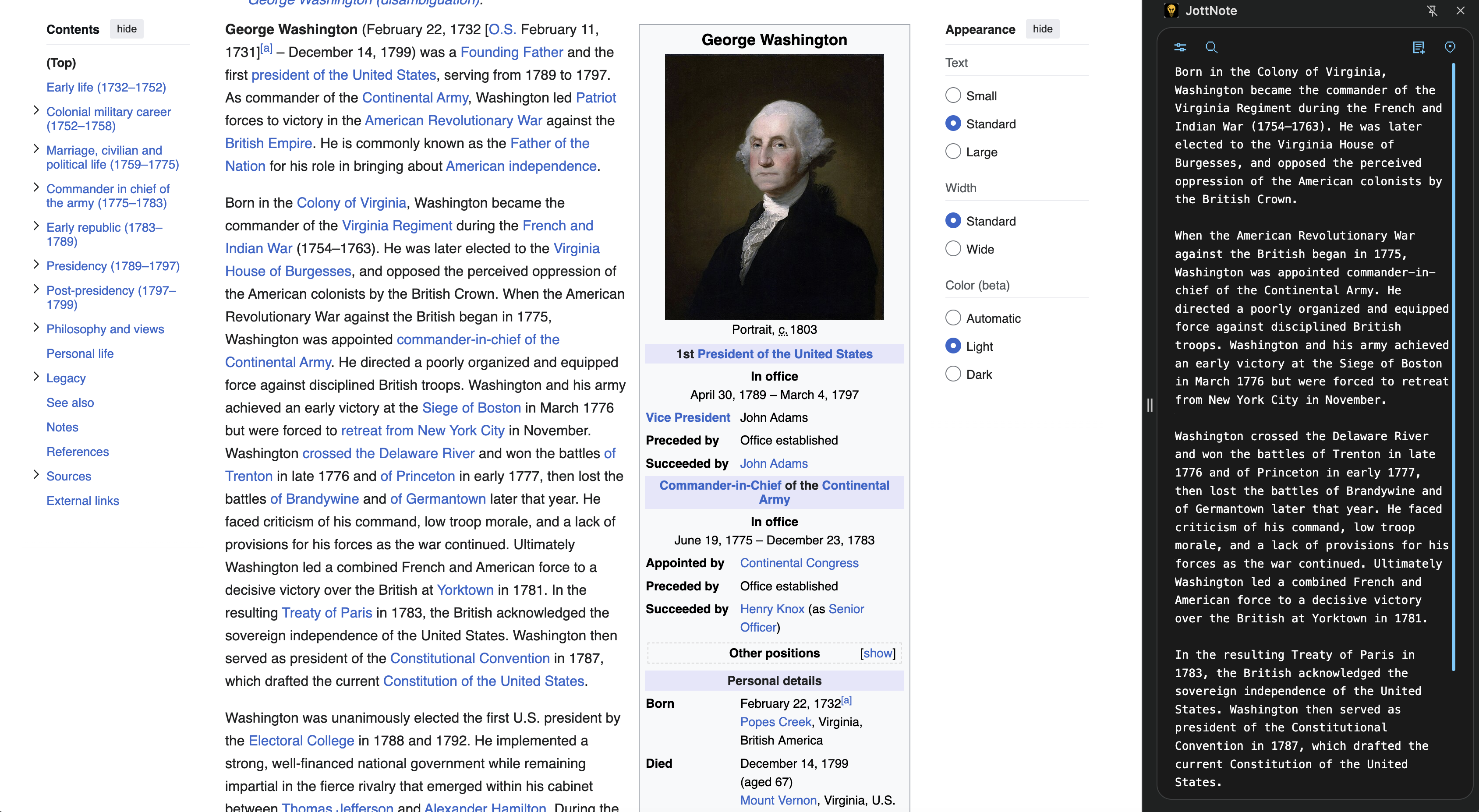
- JottNote can run in the Chrome Side Panel, allowing you to take notes while viewing other websites.
- Enable: Go to Settings → Notes tab → Check "Open in Side Panel".
- Activate: Click the extension icon to open the Side Panel.
- Immersive Mode: In Side Panel mode, the header and footer toolbars auto-hide to minimize distractions. Hover over the top or bottom of the panel to reveal them.
- Disable: Uncheck the setting to return to the standard popup mode.
Navigation
Basic Navigation
- Previous (Left Arrow): Navigate to the previous (older) note. Notes are ordered by when they were created, so the order never changes as you navigate.
- Next (Right Arrow): Navigate to the next (newer) note. If you are already on the newest note, a new blank note is created automatically.
- New Note: Creates a fresh blank note and navigates to it.
Jump to Front
- Instantly navigates to the most recently modified note — whichever note you last edited.
- Shortcut: CmdShiftJ (Mac) / CtrlShiftJ (Windows)
Pin to Top
- Updates the current note's last-modified time so it becomes the most recently modified note.
- After pinning, "Jump to Front" will navigate to this note.
- Click the pin icon in the header toolbar, or use the shortcut: CmdShiftP (Mac) / CtrlShiftP (Windows)
Delete
- Click the delete button to remove the current note permanently.
- After deletion, JottNote navigates to the nearest remaining note.
Global Hotkey
- The Global Hotkey will open JottNote even when you're focused on another tab
Link Shortening
JottNote automatically shortens URLs so they don't take up as much space. This shortening is only visual and the full URL exists in the notes data — when you highlight and copy a shortened URL, the full URL text is sent to the clipboard.
- Open the URL in your browser with Cmd/Ctrl + Click
- Expand the shortened URL with Cmd/Ctrl + Shift + Click. This will allow you to edit the URL text. Expanded links stay expanded until you manually shorten them again
- When you copy a shortened URL, the full URL is sent to the clipboard
- URLs will only shorten after your text cursor leaves it
- Duplicate URLs will have a "[#]" appended to them
- Link shortening is disabled in "code" notes
Global Keyboard Shortcuts
All shortcuts use Cmd on Mac or Ctrl on Windows/Linux, combined with Shift:
- Hover Popup: Place your cursor over any link to see the full URL and keyboard shortcuts at the bottom of the window.
- Disable in Settings: You can turn off link shortening in the Settings panel
Copy
- Keywords (e.g. "math", "list") at the top of the note are not copied to the clipboard. Note that optional titles (e.g. "math: My Optional Title") will be included (e.g. "My Optional Title").
- In lists, the symbols you use to check off items (e.g. "/x") are not copied to the clipboard.
- Shortened links are always expanded when copied to the clipboard.
- Click any math answer, sum, average, or count statistic to copy it to the clipboard.
- When using the copy button on a math note, each expression is paired with its result (e.g. "5 + 3 = 8").
- When using the copy button on a sum, average, or count note, the computed results are included at the end of the copied text.
Paste
- Formatting is stripped.
- Bullets and numbered lists are stripped.
- Leading and trailing spaces on each line are stripped.
- Markdown can be optionally stripped.
- Empty lines can be optionally stripped.
You can configure paste behavior in the Settings panel.
Feature Requests & Roadmap
We use Canny to collect feature requests and share our public roadmap. Here you can:
- Submit feature requests — Describe the feature you'd like to see and why it would be useful.
- Vote on existing requests — Upvote ideas from other users to help us prioritize what to build next.
- View the roadmap — See which features are planned, in progress, or recently completed.
- Track status updates — Follow specific requests to get notified when their status changes.
Visit the board at jottnote.canny.io.
Keywords
Intro
Keywords can be typed in the first line of any note to activate special powers in that note. For example, typing "list" at the top of the note will turn every subsequent line into a list item.
Optional title with keyword
You can add a title beside the keyword using a colon.
list: Today's TasksCustomize keywords
- In settings you can change the keyword for any function to whatever you want (e.g. "todo" or "items")
- You can have multiple keywords activate the same function.
Slash command to quickly see keywords
- Type "/" as the first character of any line and all the main keywords will appear.
- You can auto paste one by pressing the corresponding number.
- If there is an existing keyword, it will be replaced.
Templates
- Type
templateto view a help guide with all saved templates.
Create
- Type
template:createto start creation mode. - Enter the template name on the next line.
- Add your content.
- Type
template:endto save.
Use
- Type
template:your_template_nameto instantly replace the current note with your template.
List
- Type
templateto see a clickable list of all your saved templates.
Placeholders
Placeholders let you define key-value pairs that are automatically substituted into templates when you use them. This is useful for values that appear in many templates, like your name, email, or company.
View Saved Placeholders
- Type
placeholderto see all your saved placeholders and their values.
Create Placeholders
- Type
placeholder:createto start creation mode. - Add one placeholder per line in the format:
key value(the first word is the key, the rest is the value). - Type
placeholder:endto save.
placeholder:create
name Adam Davis
email adam@example.com
company JottNote Inc.
placeholder:end
Using Placeholders in Templates
- In any template, use
{{key}}syntax to insert a placeholder value. - When you load a template, saved placeholders are automatically replaced with their values.
- If a placeholder isn't saved, JottNote will prompt you to fill it in manually.
Built-in Placeholders
{{date}}— today's date in your preferred format{{time}}— current time{{day}}— day of the week{{month}}— current month name{{year}}— current year
Bookmarks

- Type
bookmarksto view all your saved bookmarks sorted by recent access.
Add
- Type
bookmarks:addto start adding a bookmark. - Enter the URL, Title, and Tags on subsequent lines.
- Type
bookmarks:saveto save.
Search
- Type
bookmarks:search queryto find bookmarks by title, URL, or tag.
Filter by Tag
- Type
bookmarks:your_tagto see all bookmarks with that tag.
Import Chrome Bookmarks
- Type
bookmarks:importto pull all your Chrome bookmarks directly into JottNote. - You can also import from Settings → Notes tab using the "Import Chrome Bookmarks" button.
- Duplicate bookmarks (matching URLs) are automatically skipped.
Edit
- Type
bookmarks:edit:idto edit an existing bookmark (ID is shown in the bookmark display). - Modify the URL, title, or tags as needed.
- Type
bookmarks:saveto save your changes.
Slash Command
- You can also access bookmarks via the
/menu.
Sessions
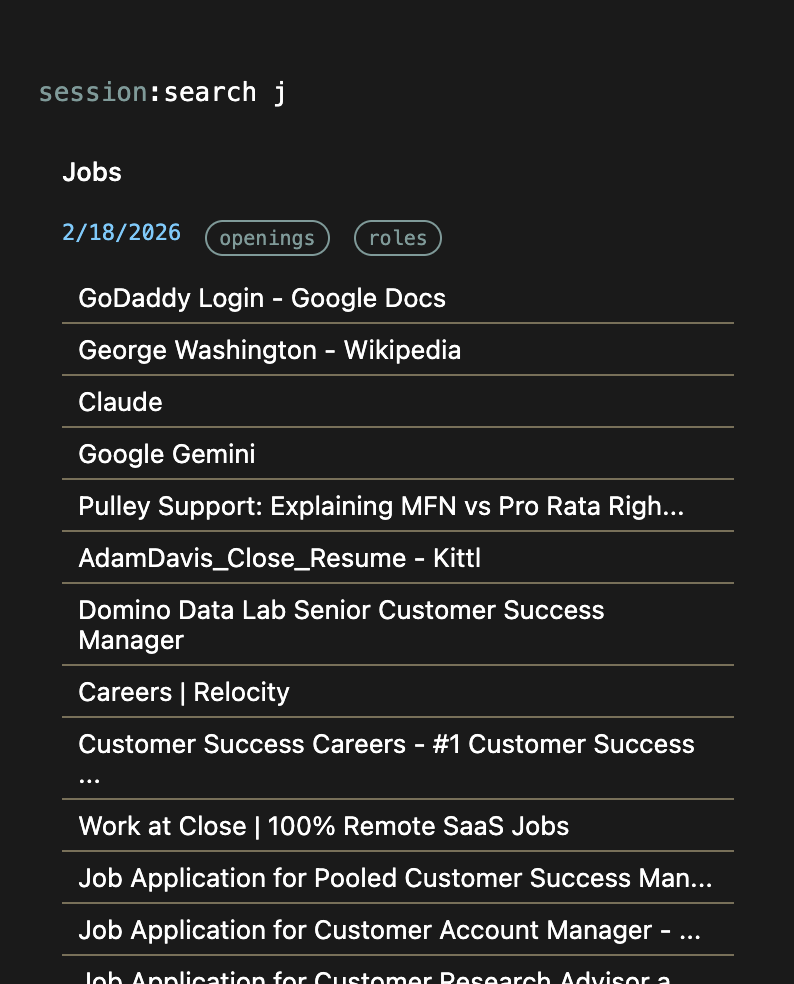
- Type
sessionto view all your saved sessions sorted by recent modification. - Sessions capture all your open tabs (HTTP/HTTPS only) with titles and URLs.
- Each session shows its title, number of tabs, and last modified date.
Save Current Session
- Type
session:importto instantly save all your currently open tabs as a new session. - You can also save from Settings → Notes tab using the "Save Current Session" button.
- All open tabs are automatically captured (excludes chrome:// pages and JottNote itself).
- Session is saved with tab count, URLs, titles, and timestamp.
Add Session Manually
- Type
session:addto start adding a session manually. - Enter the session title on the next line.
- Add URLs on subsequent lines (one per line).
- Optionally add tags with
Tags: work, research - Type
session:endto save the session.
Search Sessions
- Type
session:search queryto find sessions by title or URL. - Search is case-insensitive and matches partial text.
Filter by Tag
- Type
session:your_tagto see all sessions with that tag. - Tags help organize sessions by project, topic, or workflow.
Open Sessions
- Open All: Click the "Open All" button to open all tabs in the session at once.
- Individual URLs: Click any URL to open just that tab.
- URLs are displayed with their page titles for easy identification.
Edit Sessions
- Type
session:edit:idto edit an existing session (ID shown in session display). - Modify the title, URLs, or tags as needed.
- Type
session:endto save your changes.
Delete Sessions
- Click the delete button next to any session in the session display.
- Confirm the deletion when prompted.
Import/Export Sessions
- Export sessions as JSON from Settings → Notes tab.
- Import sessions from JSON or zip files.
- See the Export & Import section for details.
List
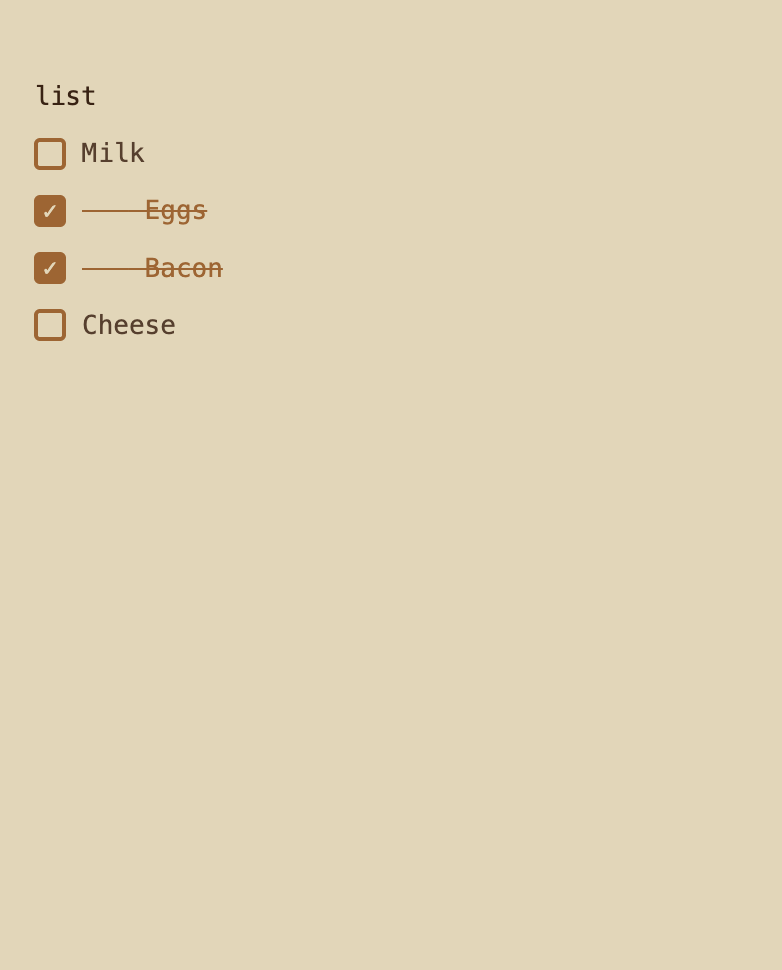
- Type the word "list" at the top of your note to activate list features.
- You can title a list with "list: Your Title"
- Every non-empty line will automatically become a checklist item.
- Type the "check" trigger (e.g. "/x") at the end of any line to check it.
- Click on checkboxes to toggle them checked/unchecked.
- Note that math and conversions do not work in lists.
- You can type "//" at the beginning of a line to make it a comment. This will prevent it from being a checkbox.
- You can type "#", "##", or "###" at the beginning of a line to make it a heading. This will prevent it from being a checkbox.
Math
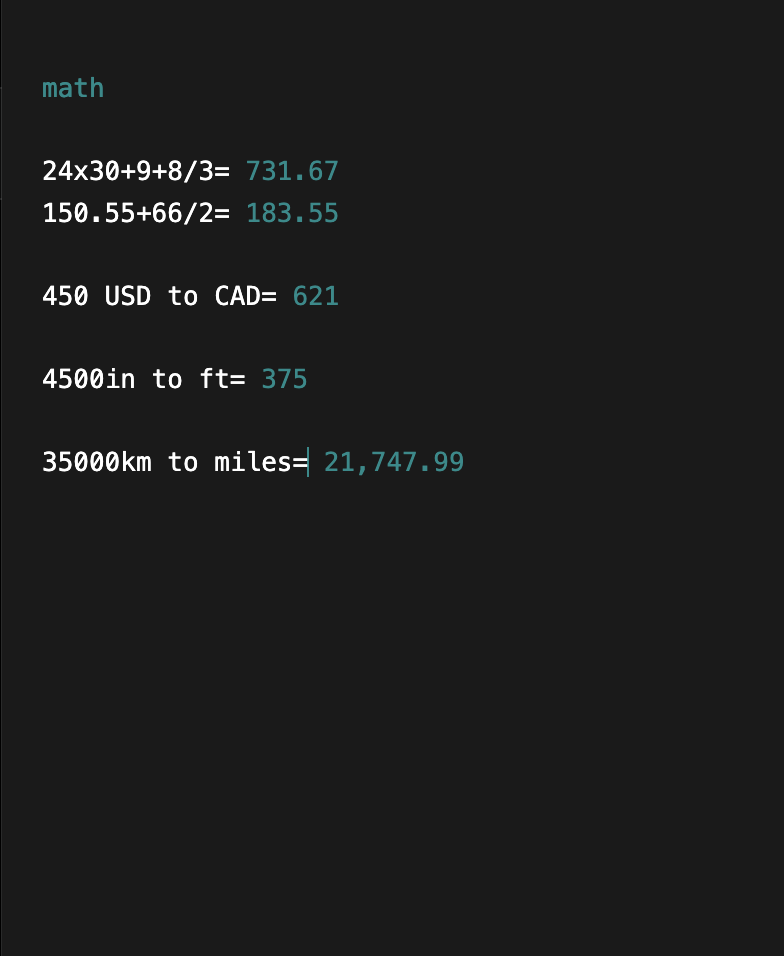
- Type the word "math" at the top of your note to activate math features.
- Or type "/" at the beginning of any new line, and then choose "math".
- You can title a math note with: "math: Your Title"
- You can type "//" at the beginning of a line to make it a comment. This will prevent it from being calculated.
Calculations
- Adding "=" to the end of any line will attempt a calculation.
- Words, punctuations, and currency symbols are stripped out.
- Valid operators include: +, -, *, x, X, /, ÷, ^, **, (, )
- You can also do colloquial percentage calculations: "100 + 15% = 115" or "50% of 200 = 100".
- Advanced features include: !, !!, √16, √8, sqrt(16), log(355), log2(355), ceil(12.256), floor(12.256)
- We support regions where the period is used as a thousands separator and the comma is used as a decimal separator (e.g. 1.000,25).
Measurement Conversions
- Use the following format to convert measurements:
10" to cm = 25.40 cm- We support distance units: m, cm, mm, km, in, ft, mile, yard
- We support area units: sqm, sqcm, sqkm, sqft, sqin, acre, hectare
- We support volume units: liter, mL, gallon, quart, pint, cup, fl oz, tablespoon, teaspoon
- We support mass units: kg, g, mg, lb, oz, stone, ton
- We support temperature units: celsius, fahrenheit, kelvin
Mixed-Unit Arithmetic
You can perform arithmetic between values with different units in the same expression. Use
in, to, or -> at the end to specify your desired output unit.
Same-Category Mixed Units
Combine values from different units within the same category (e.g., weight, length) and convert the result:
35kg + 250lbs in lbs = 327.16 lbs
5ft + 3in in cm = 160.02 cm
2gal + 500ml in liters = 8.07 liters
100f + 50c in f = 190 f
Currency & Crypto Arithmetic
Add, subtract, or combine amounts in different currencies or cryptocurrencies. Rates are applied automatically:
$100 USD + €50 EUR in USD = $155.23 USD
0.5 BTC + 1 ETH in USD = $55,234.12 USD
1000 GBP - 200 EUR in USD = $1,042.50 USD- Currency symbols (
$,€,£,¥,₿) are recognized automatically. - You can mix fiat and crypto in the same expression as long as you specify an output unit.
Arithmetic with Parentheses
Use parentheses for grouping, and multiply or divide unit-bearing values by plain numbers:
(10km - 3mi) * 2 in miles = 6.42 miles
(5kg + 3kg) * 2 in lbs = 35.27 lbs
Label Scalar Results
If your expression has no units but you want to label the answer, just add a target unit at the end:
50 * 1.5 in kg = 75 kg
100 / 3 in USD = $33.33 USD
Rules & Tips
- All unit-bearing values in the expression must be from the same category (e.g., all
weights or all lengths). Mixing categories like
5kg + 3mileswill show an error. - Plain numbers (without units) act as scalars for multiplication, division, and other operations.
- Attach units directly to numbers with no space (
35kg) or with a space (35 kg). - The target keyword (
in,to,->) must have a space before and after it. This keeps3in(3 inches) separate fromin cm(convert to centimeters). - Simple one-to-one conversions still work exactly as before:
10 km to miles =
Interact
- Click any math result to copy it to your clipboard.
- Hover over a result to see it underline.
- Results update instantly as you type.
Variables
You can assign values or calculations to a variable. You can use the variable in other calculations.
number of guests : 9
number of guests + 1 = 10.00- Updating the variable's value instantly updates everything that uses that variable.
- Variable names can have spaces in them.
- If you start typing 3 letters or more that match your variable, an autocomplete window will show up.
- Tab will select the first autocomplete option, or press a number key to choose a specific one.
Currency Conversions
Currency conversions work inside math notes. Use the following format to convert currencies:
10 USD to JPY = 1,492.84 JPY- Currency rates are updated every day.
- If you use your currency symbol without a currency code, we will assume your primary currency:
$10 to JPY = 1,492.84 JPY- If you do not put any conversion target, we will assume you want to convert your primary currency to your secondary currency:
$10 = 14.00 CAD- We support 160+ fiat currency codes including USD, EUR, GBP, JPY, and more.
- We support common currency symbols: $, €, £, ¥, ₹, ₽, ₩, ₺, ₫, ฿, ₴, ₦, ₲, ₵, ₡, ₭, ₾, ₱, ₪, ₸
Cryptocurrency Support
- Convert between 30+ major cryptocurrencies including Bitcoin (BTC), Ethereum (ETH), Solana (SOL), and more.
- Crypto-to-Crypto: Convert between cryptocurrencies
1 BTC to ETH = 15.23 ETH
100 USDT to USDC = 100.05 USDC- Crypto-to-Fiat: Convert cryptocurrency to any fiat currency
0.5 ETH to USD = 1,842.50 USD
1 BTC to EUR = 42,153.28 EUR- Fiat-to-Crypto: Convert fiat currency to cryptocurrency
1000 USD to BTC = 0.0215 BTC
500 EUR to SOL = 8.42 SOL- Cryptocurrency rates are updated every 5 minutes for accurate pricing.
- Fiat currency rates are updated every 24 hours.
- Supported cryptocurrencies: BTC, ETH, USDT, BNB, SOL, XRP, USDC, ADA, DOGE, TRX, AVAX, DOT, MATIC, LTC, LINK, BCH, SHIB, UNI, ATOM, XLM, XMR, ETC, ALGO, FIL, APT, VET, HBAR, ICP, NEAR, ARB
Configure your primary and secondary currencies in the Settings panel.
Sum
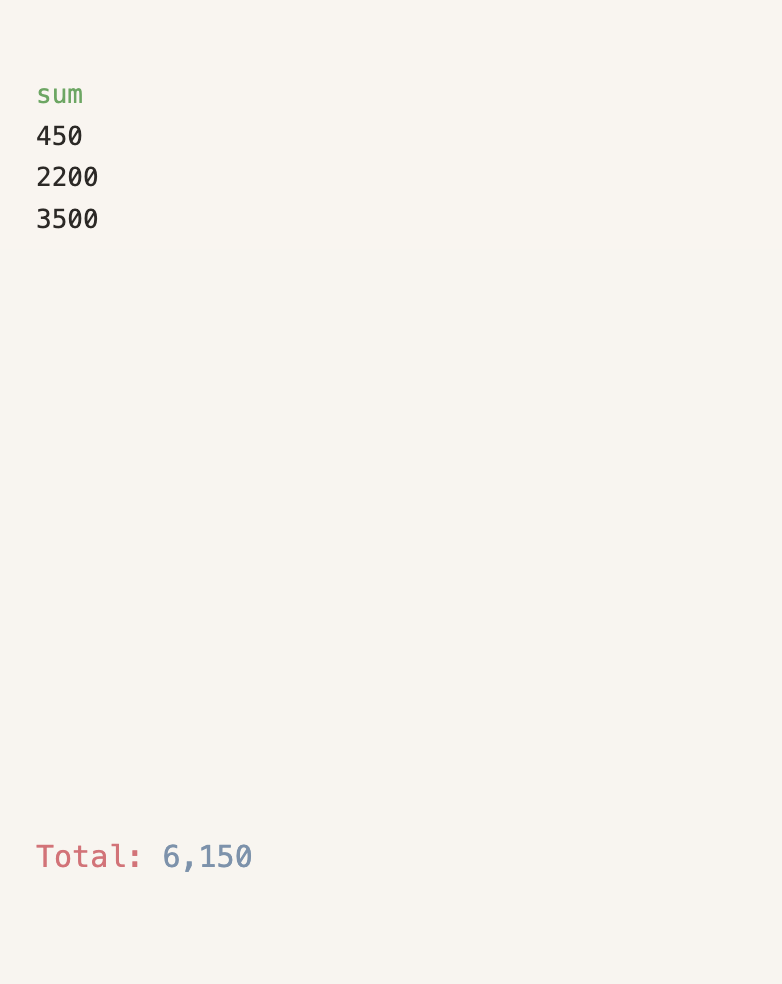
- Type the word "sum" at the top of your note to activate. JottNote will try to find all the individual numbers in your note.
- All non-numbers, punctuations and symbols are stripped out.
- At the moment, fractions are not supported and will lead to incorrect answers (e.g. 1 1/4 eggs)
- You can type "//" at the beginning of a line to make it a comment. This will prevent it from being summed.
- Click the total to copy it to your clipboard.
Average
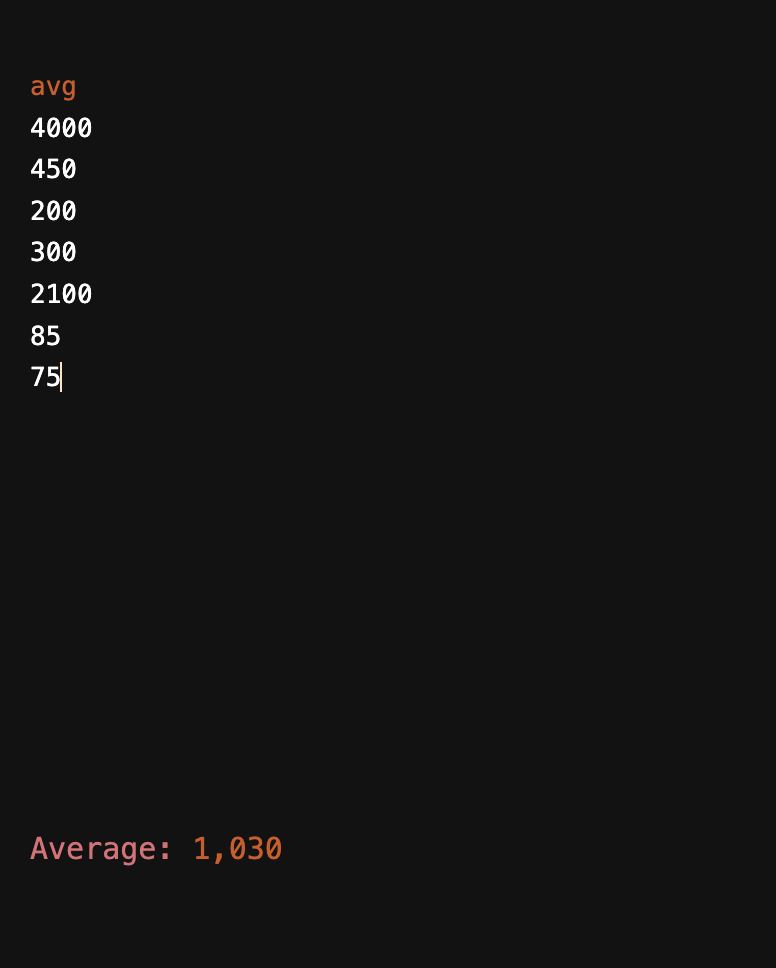
- Type the word "avg" at the top of your note to activate. JottNote will try to find the average of all the numbers in your note.
- All non-numbers, punctuations and symbols are stripped out.
- At the moment, fractions are not supported and will lead to incorrect answers (e.g. 1 1/4 eggs)
- You can type "//" at the beginning of a line to make it a comment. This will prevent it from being averaged.
- Click the average to copy it to your clipboard.
Count
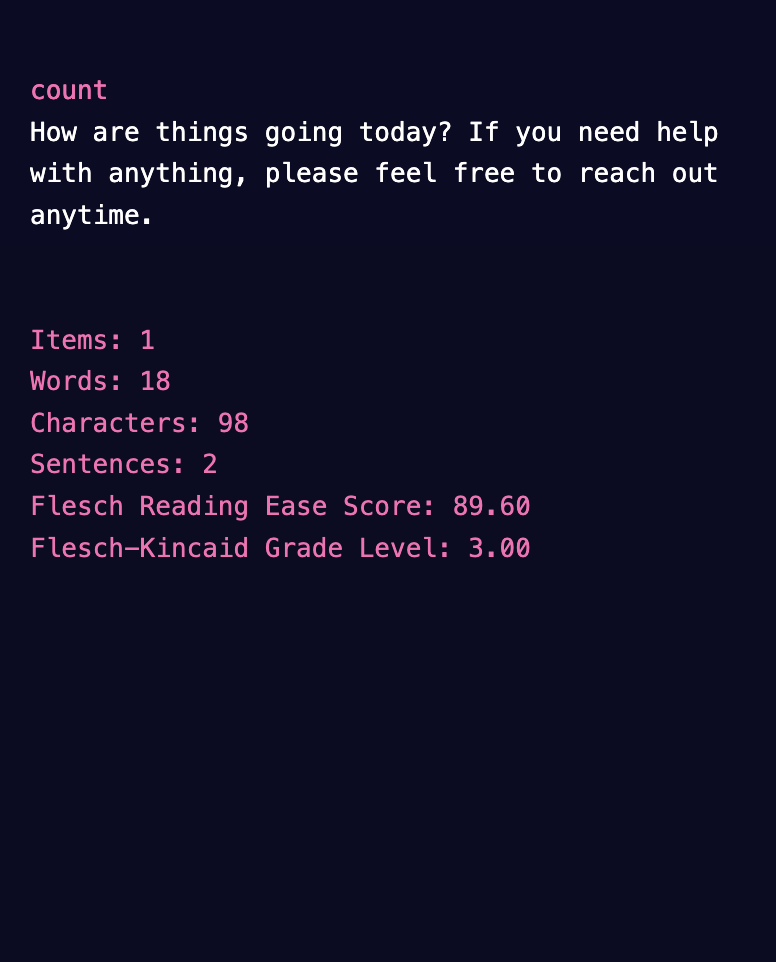
- Type the word "count" at the top of your note to activate.
- You can type "//" at the beginning of a line to make it a comment. This will prevent it from being counted.
Statistics Display
An overlay will show:
- Items (non-empty lines)
- Words
- Characters
- Sentences
- Flesch Reading Ease: 0–100 score (Higher = Easier)
- Flesch-Kincaid Grade Level: US Grade level estimation
Interact
- Click any statistic to copy it to your clipboard.
- Hover to see the value dim.
- Statistics update instantly as you type.
Code
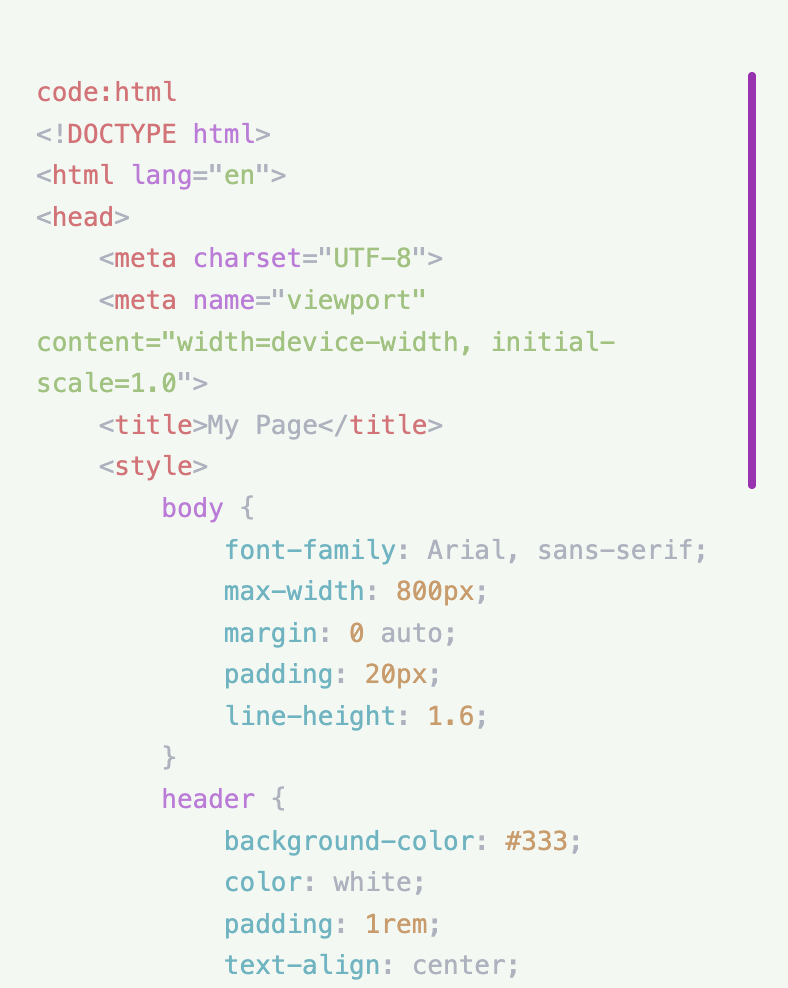
- Type code at the top of your note to activate code mode.
- Add a language after a colon (e.g. code: py) to enable syntax highlighting.
- Type code: help to see a quick reference of supported languages inside the app.
- If you don't add a language, JottNote will use the default language from Settings.
- Choose your syntax highlighting theme in Settings.
- Pasting code preserves original formatting (no link shortening or formatting strip).
Supported Languages & Abbreviations
| Language | Abbreviations |
|---|---|
| JavaScript / TypeScript | js, javascript, ts, typescript, jsx, tsx |
| Python | py, python |
| HTML / XML | html, htm, xml, svg |
| CSS | css, scss, sass, less |
| Java / Kotlin / C# | java, kt, kotlin, cs, csharp |
| PHP | php |
| Ruby | rb, ruby |
| Swift | swift |
| Go | go, golang |
| C / C++ | c, cpp, c++, h, hpp |
| Rust | rs, rust |
| Shell / Bash | sh, bash, shell, zsh |
| SQL | sql, mysql, pgsql, sqlite |
| JSON | json |
Timer
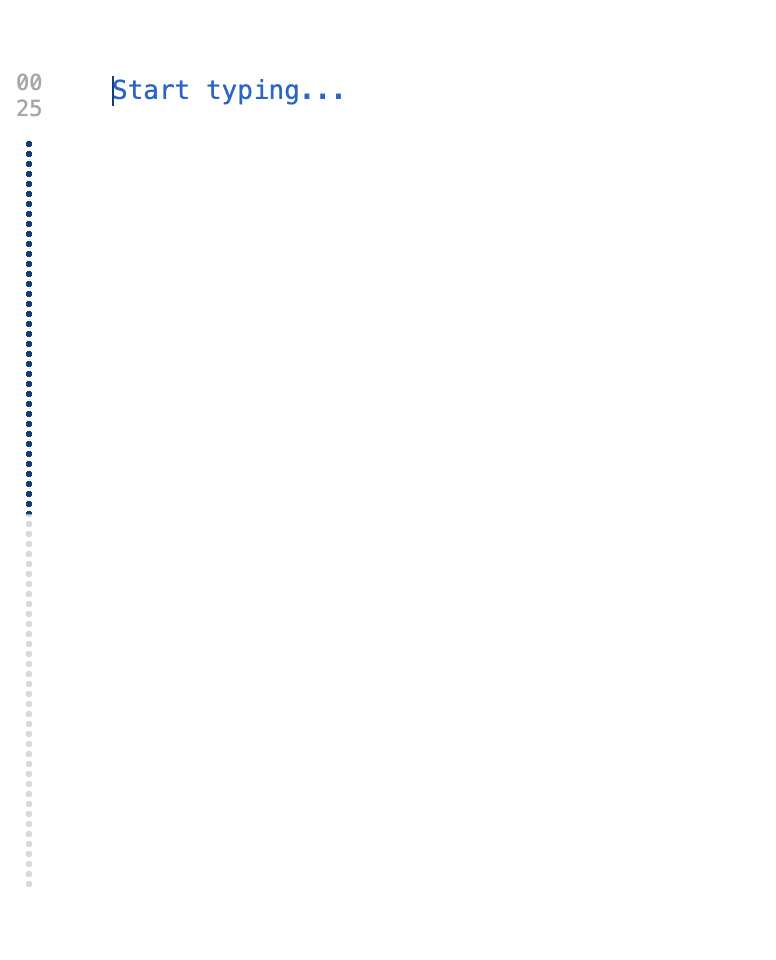
- Type "timer" at the beginning of a note to see the tutorial
- Unlike Keywords, Timer commands can be activated at the beginning of any new line.
Timer Commands
timer— Starts a stopwatchtimer 3.5/timer 3:30— Starts a countdown timer for 3.5 minutestimer 5: Do laundry— Title a countdown timertimer 5 1— Starts a pomodoro timer with 5 minutes of work and 1 minute of resttimer pomo— Starts a standard pomodoro of 25 mins / 5 minstimer p— Pause / Resume timertimer r— Restart current timertimer s/timer 0— Stop timer
Timer Interaction
- You can also click the timer to pause, or double-click it to stop.
- Press Escape to stop the timer.
- When a timer completes, you'll see a completion screen with fun facts and a chime sound.
Sort
Sort commands let you reorder lines in your note. Type a sort command on the first line, add your content
below, then type sort:end to execute the sort.
Sort Commands
sort:asc— Sort lines by ascending numeric valuesort:desc— Sort lines by descending numeric valuesort:length— Sort lines by character length (shortest first)sort:abc— Sort lines alphabetically
How It Works
- Type a sort command (e.g.
sort:asc) on the first line of your note. - Add the lines you want to sort below.
- Type
sort:endon a new line to execute the sort. - The sorted result replaces your content (the
sort:endline is removed). - Empty lines are preserved in their original positions.
- Non-numeric lines are pushed to the end when using
sort:ascorsort:desc.
Help
- Type
sortby itself (with no other content) to see the help guide inside the app.
Date
Type date at the top of your note to activate date mode. Each line below the keyword is treated
as a date expression.
Date Expressions
today— Shows today's datenow— Shows the current date and timeday— Shows the day of the week (e.g. Wednesday)month— Shows the current month name (e.g. February)year— Shows the current year
Date Arithmetic
Add or subtract days, weeks, months, or years from any date:
today + 14 days
today - 3 weeks
Dec 25 + 1 year
tomorrow + 6 months
Date Differences
Calculate the number of days between two dates:
Dec 25 - today
Jan 1 2027 - today
Results show the total days and a human-readable breakdown (years, months, weeks, days).
Supported Date Formats
today,tomorrow,yesterdayDec 25,Dec 25 2026,December 25, 20262026-12-25(ISO format)12/25/2026or12/25(US format)25 Dec 2026(day-first format)
Comments
- You can type "//" at the beginning of a line to make it a comment. Comments are not evaluated.
Mini-Games

- Type the command to start a game overlay. Click outside the game to exit.
Tic-Tac-Toe
- Command:
game:tic - Play against a smart AI opponent. Tracks your wins, losses, and draws.
Hangman
- Command:
game:hangman - Guess tech-themed words from a bank of 50+.
- Features a 7-stage ASCII art animation.
- Use the on-screen keyboard or type with your physical keyboard.
Quiz
- Command:
game:quiz - Test your knowledge across 8 categories: General, Science, History, Geography, Tech, Movies, Sports, and Literature.
- Each round consists of 10 randomly selected questions for endless replayability.
- Get immediate feedback and a final score breakdown.
Wordle
- Command:
game:wordle - Guess a random 5-letter word in 6 attempts.
- Color-coded feedback shows correct letters and positions after each guess.
- 200+ word bank for variety.
Minesweeper
- Command:
game:mines - Classic Minesweeper on a 9×9 grid with 10 hidden mines.
- Click to reveal cells, right-click to flag suspected mines.
- Includes a timer — reveal all safe cells to win.
Memory Match
- Command:
game:memory - Match 12 pairs of symbol cards on a 6×4 grid.
- Flip two cards at a time to find matching pairs.
- Tracks the number of moves to complete the board.
Typing Speed Test
- Command:
game:type - Type randomly selected passages as fast as you can.
- Measures words-per-minute (WPM) and accuracy in real-time.
- 30 passages covering various topics.
Reaction Time
- Command:
game:react - Test your reflexes — wait for the zone to turn green, then click as fast as possible.
- 5 rounds with randomized delays (2–5 seconds).
- Displays your average reaction time at the end.
Search
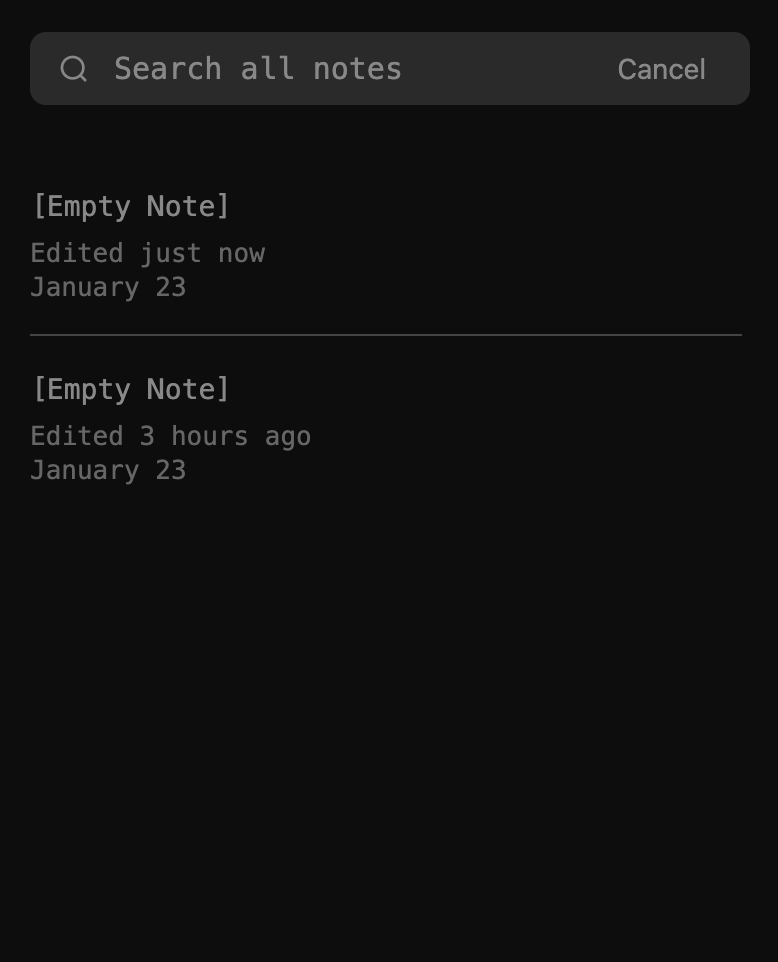
JottNote is meant for temporary notes, so storing, organizing, and searching features will continue to be barebones.
- When nothing is in search, all notes will be shown.
- When a search term is entered, JottNote will only show notes that contain that search term.
- Click the search icon in the header to open the search panel.
- Navigate results with arrow keys, Enter to jump to a note, Escape to close.
Tags
Add tags anywhere in a note by typing # followed by a word, e.g. #work,
#ideas, #todo. Tags are case-insensitive and can contain letters, numbers,
hyphens, and underscores.
- Tags are automatically highlighted with theme accent colors in the editor.
- The same tag always shows the same accent color, even across different notes.
- Open the search panel and type
#to see all tagged notes and a tag cloud showing every tag with its count. - Click a tag pill in the cloud or type a full tag like
#workto filter notes containing that tag. - Matching tags are highlighted in search result previews.
- Non-tag searches (without
#) work exactly as before.
Find and Replace
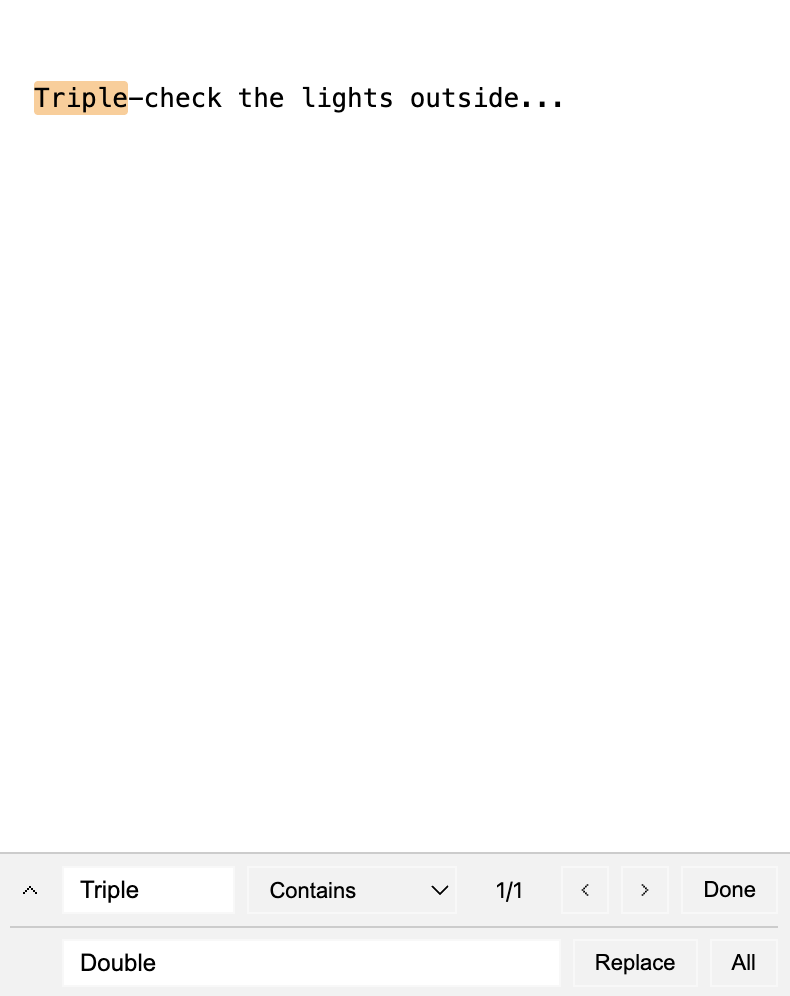
- Search and replace text in the current note.
- Click the "Aa" icon to make case sensitive searches.
Match Modes
- Contains: Search for text that contains the search term.
- Matches Word: Search for the whole word.
- Starts with: Search for lines that start with the search term.
- Ends with: Search for lines that end with the search term.
- Regex: Search for text that matches a regular expression.
- When Find and Replace is opened, all links are expanded.
- Use Enter/Shift+Enter or arrow buttons to navigate matches.
- Visual match highlighting shows yellow for matches, orange for current match.
Simple Markdown
- #, ##, ### — Create a heading
- **bold**, _italic_, ~strikethrough~, __underline__
- // — Comment out a line (comments will remove the line from checklists and calculations)
Spell Check
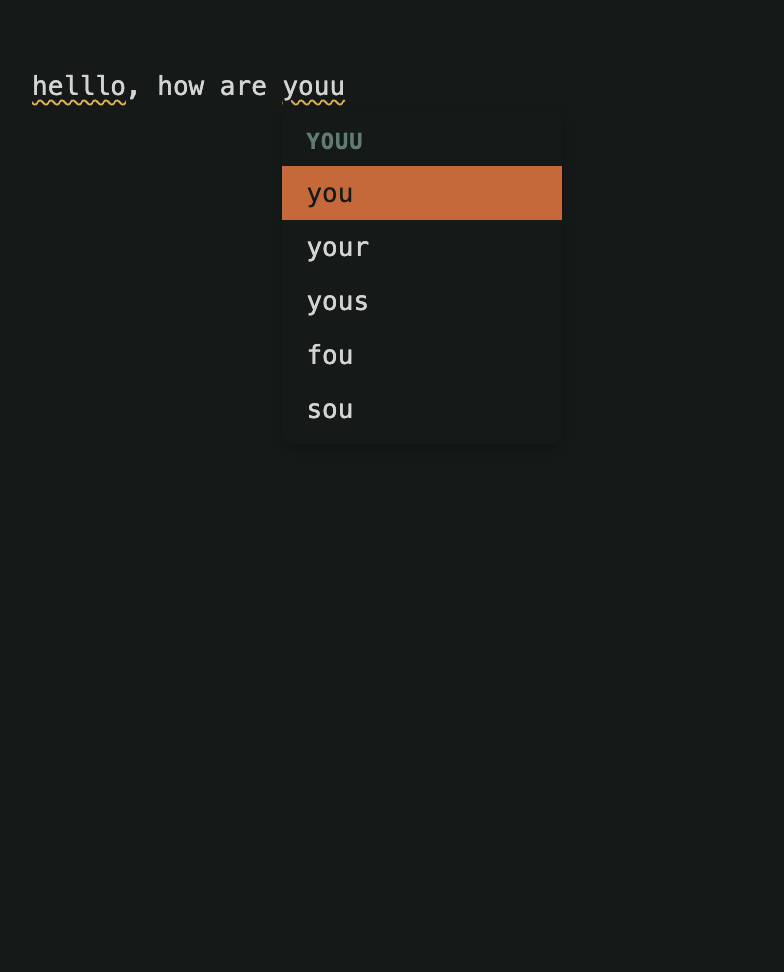
- Misspelled words are underlined with a wavy line.
- Click to Fix: Click any misspelled word to see a menu of up to 5 suggestions.
- Theme Aware: The menu matches your current theme's accent colors.
- Toggle this feature on/off in Settings > Notes.
Automatic Backups
JottNote can automatically back up all your notes at a configurable interval. Backups are stored locally in Chrome's storage alongside your notes.
Settings
- Backup Interval — Use the slider in Settings → Notes to choose how often backups are created. Options range from every 10 minutes to Never (default: Never).
- Backup Count — Set the maximum number of backups to keep. Older backups are automatically removed when the limit is reached (default: 12).
Interval Options
- 10 minutes, 30 minutes, 1 hour, 3 hours, 6 hours, 12 hours, 1 day, 1 week, or Never
How It Works
- When enabled, JottNote saves a snapshot of all your notes on the chosen schedule.
- Each backup is timestamped so you can identify when it was created.
- Backups are rotated automatically — the oldest backup is removed when the count limit is reached.
Auto-Delete
JottNote can automatically delete notes that haven't been modified within a chosen time period. This runs once on startup.
Settings
- Auto-Delete Period — Use the slider in Settings → Notes to choose how long unmodified notes are kept. Options: Today, 1 Week, 1 Month, 1 Year, or Never (default: Never).
How It Works
- When JottNote opens, it checks each note's last-modified date.
- Notes that haven't been modified within the chosen period are automatically deleted.
- Pinned notes and the current note are never auto-deleted.
- This only runs on startup — notes are not deleted while you're actively using JottNote.
Export & Import
JottNote provides a comprehensive export and import system that allows you to backup all your notes, bookmarks, and sessions, manually edit them if needed, and restore them on any device.
Export Notes, Bookmarks & Sessions
- Open Settings → Notes tab
- Click "Export as .zip"
- A zip file will download containing:
- All notes as individual
.txtfiles - All bookmarks as a single
bookmarks.jsonfile - All sessions as a single
sessions.jsonfile
- All notes as individual
- The zip filename includes the current date (e.g.,
JottNote Export - Jan 26 2026.zip)
What Gets Exported
- Notes: Each note is saved as a separate .txt file with its content preserved exactly
- Bookmarks: All bookmarks saved in a user-editable JSON format with:
- URL
- Title
- Tags (comma-separated for easy editing)
- Description
- Creation, modification, and access timestamps
- Sessions: All sessions saved in a user-editable JSON format with:
- Title
- Tags (comma-separated for easy editing)
- URLs (array of tab URLs)
- Tab count
- Creation, modification, and access timestamps
Import Notes
- Open Settings → Notes tab
- Click "Import .txt notes"
- Select a zip file containing
.txtnote files - All
.txtfiles in the zip will be imported as new notes - Empty files are automatically skipped
- Import results summary shows how many notes were imported and skipped
Import Bookmarks
- Open Settings → Notes tab
- Click "Import bookmarks.json"
- Select a zip file containing a
bookmarks.jsonfile - The import process includes automatic validation:
- URL Validation: Ensures all URLs are valid and normalizes them
- Duplicate Prevention: Skips bookmarks with URLs that already exist
- Tag Parsing: Converts comma-separated tag strings to arrays
- Reserved Keywords: Removes invalid tags like "add", "search", "edit", "end", "save", "help"
- Date Validation: Validates timestamps or uses current date if invalid
- Title Generation: Auto-generates titles from URLs if missing
- Import results summary shows imported count, skipped count, and any errors
Import Sessions
- Open Settings → Notes tab
- Click "Import sessions.json"
- Select a zip file containing a
sessions.jsonfile - The import process includes automatic validation:
- URL Validation: Ensures all URLs are valid HTTP/HTTPS addresses
- Duplicate Prevention: Skips sessions with titles that already exist
- Tag Parsing: Converts comma-separated tag strings to arrays
- Date Validation: Validates timestamps or uses current date if invalid
- Tab Count: Automatically calculates tab count from URLs array
- Import results summary shows imported count, skipped count, and any errors
Manual Editing Before Import
You can manually edit your exported data before importing:
Editing Notes
- Unzip the export file
- Open any
.txtfile in a text editor - Make your changes and save
- Re-zip the folder and import
Editing Bookmarks
- Unzip the export file
- Open
bookmarks.jsonin a text editor - Edit URLs, titles, tags (comma-separated), or descriptions
- Save the file, re-zip, and import
Editing Sessions
- Unzip the export file
- Open
sessions.jsonin a text editor - Edit titles, tags (comma-separated), or URLs array
- Save the file, re-zip, and import
Bookmarks JSON Format Example
[
  {
    "url": "https://example.com",
    "title": "Example Site",
    "tags": "work, reference, important",
    "description": "Useful reference site",
    "createdAt": "2026-01-24T10:30:00.000Z",
    "modifiedAt": "2026-01-24T10:30:00.000Z",
    "accessedAt": "2026-01-24T10:30:00.000Z"
  }
]
Sessions JSON Format Example
[
  {
    "title": "Research Project",
    "tags": "work, research, important",
    "urls": [
      "https://example.com/article1",
      "https://example.com/article2",
      "https://github.com/project"
    ],
    "tabCount": 3,
    "createdAt": "2026-01-26T10:30:00.000Z",
    "modifiedAt": "2026-01-26T10:30:00.000Z",
    "accessedAt": "2026-01-26T10:30:00.000Z"
  }
]
Common Use Cases
- Switching Computers: Export on old computer, import on new computer
- Backup: Regularly export to cloud storage (Dropbox, Google Drive, etc.)
- Sharing: Export specific notes, bookmarks, or sessions to share with others
- Bulk Editing: Export, edit multiple items at once in a text editor, then re-import
- Data Migration: Transfer data between different installations of JottNote
- Project Archiving: Export sessions to preserve research or project tab collections
Color Themes
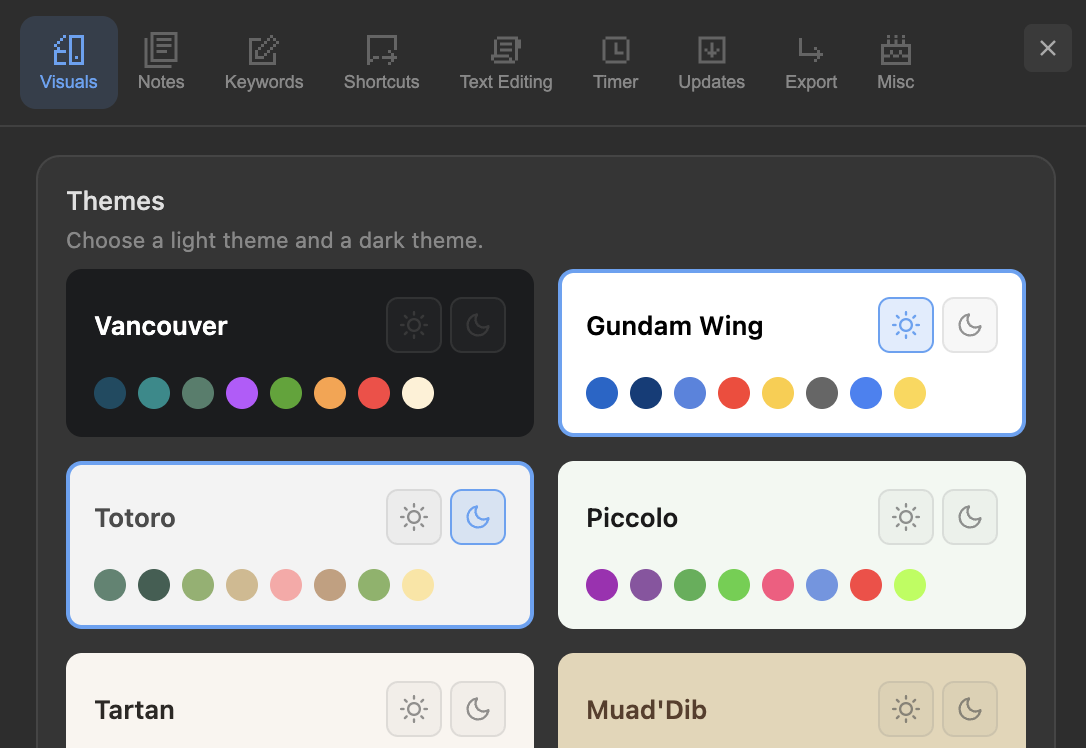
- Choose a theme in the Settings panel.
- 14 built-in themes: Vancouver, Gundam Wing, Totoro, Piccolo, Tartan, Muad'Dib, Sanrio, Tokyo Drift, Vendetta, Mononoke, A24, Agrabah, Knight, Shadow Moses
- Choose separate themes for light mode and dark mode by clicking the Sun and Moon icons on each theme card.
- Your light and dark themes switch automatically based on your system preference.
- Create your own custom theme with the Theme Maker, or import a
.jsontheme file directly in Settings.
Theme Maker
The Theme Maker is a standalone tool for designing custom JottNote themes. It runs in your browser — no installation required.
How It Works
- Name your theme — give it a descriptive name.
- Choose a base theme — start from any of the 14 built-in themes as a starting point, or start from scratch.
- Customize colors — adjust 10 color values across four groups:
- Background: Main background color
- Text: Primary text and secondary/subtle text
- Accents (6): Colors used by math, list, sum, code, count, and misc keywords
- Border: Dividers and separators
- Preview in real-time — four live preview panels show how your theme looks across different JottNote modes (notes, checklist, math, code).
- Export — download the theme as a
.jsonfile or copy the JSON to your clipboard.
Importing Your Custom Theme
- Open JottNote and go to Settings.
- Click "Import Custom Theme" in the Themes section.
- Select your exported
.jsonfile. - Your custom theme will appear as a new card in the theme grid.
- Click the Sun or Moon icon to set it as your light or dark theme.
Text Size
- Choose a text size in the Settings panel.
- Available sizes: XS, S, M, L, XL
- You can also double the text size for maximum readability.
Dictionary & Thesaurus Pro
Look up word definitions, synonyms, and antonyms directly inside JottNote using the define and
related keywords.
Define (Dictionary)
Type define: followed by a word to see its definitions, phonetic pronunciation, and parts of
speech.
define:love— shows definitions for "love" organized by part of speech (noun, verb, etc.)define:serendipity— look up any English word- Each part of speech shows up to 2 definitions with example sentences when available
- Phonetic pronunciation is displayed next to the word
Related (Thesaurus)
Type related: followed by a word to find synonyms and antonyms.
related:happy— shows synonyms (e.g., cheerful, content) and antonyms (e.g., sad, unhappy)related:fast— discover alternative words for your writing- Synonyms and antonyms are displayed as color-coded tags for easy scanning
- Up to 15 synonyms and 10 antonyms are shown
Slash Command
Both keywords are available via the / slash command menu. Type / on the first line
and select define or related from the list.
UUID & Passwords Pro
Generate random UUIDs, passwords, hex strings, and base64 values.
uuid+ Enter — generate 1 UUID v4uuid:5+ Enter — generate 5 UUIDsuuid:pass+ Enter — generate a 16-character passworduuid:pass:32+ Enter — generate a 32-character passworduuid:hex+ Enter — generate a 32-character hex stringuuid:base64+ Enter — generate a base64 string- Click any result to copy it to clipboard.
Lorem Ipsum Pro
Generate placeholder text for designs and mockups.
lorem+ Enter — insert 1 paragraphlorem:3+ Enter — insert 3 paragraphslorem:words:50+ Enter — insert ~50 wordslorem:sentences:5+ Enter — insert 5 sentences- Text is inserted directly into your note.
Weather Pro
Full-screen weather display with immersive gradient backgrounds.
weather+ Enter — current weather with hourly forecast (auto-detects location)weather:Tokyo+ Enter — weather for a specific cityweather:daily+ Enter — 7-day forecastweather:tomorrow+ Enter — tomorrow's weatherweather:Tokyo:daily+ Enter — 7-day forecast for a specific cityweather:Tokyo:tomorrow+ Enter — tomorrow's weather for a specific city- Shows temperature, feels like, conditions, and hourly/daily forecasts.
- Background gradient fills the editor area, changing based on conditions and time of day.
- The keyword remains visible at the top — backspace to close, or edit to change city/mode.
- Uses the free Open-Meteo API — no API key required.
Stopwatch with Laps Pro
A stopwatch with lap tracking, accessed via the timer keyword. Displayed on the left side of the
editor.
timer:stopwatch+ Enter — start the stopwatchtimer:stopwatch p+ Enter — pause or resumetimer:stopwatch l+ Enter — record a laptimer:stopwatch s+ Enter — stoptimer:stopwatch r+ Enter — reset- Click the display to pause. Double-click to stop.
- Press Escape to stop the stopwatch.
- Laps are shown below the time with split times.